3.5 Contributing code
3.5.1 Structure of the package
The functionality of the pde package is split into multiple subpackages.
The domain, together with its symmetries, periodicities, and discretizations, is
described by classes defined in grids.
Discretized fields are represented by classes in fields, which have
methods for differential operators with various boundary conditions collected
in boundaries.
The actual pdes are collected in pdes and the respective solvers
are defined in solvers.
The actual numerical computations are done in backends, which are implemented in
backends.
3.5.2 Extending functionality
All code is build on a modular basis, making it easy to introduce new classes
that integrate with the rest of the package. For instance, it is simple to
define a new partial differential equation by subclassing
PDEBase.
Alternatively, PDEs can be defined by specifying their evolution rates using
mathematical expressions by creating instances of the class
PDE.
Moreover, new grids can be introduced by subclassing
GridBase.
The actual calculations are done by backends, which offer an interface for doing the
calculation details. These backends are defined in backends and allow
accessing their details independently. For instance, the numba-accelerated operators
can be used without any other part of the package by calling
the method make_operator() on the
numba_backend() object.
Moreover, new operators can be associated with grids by registering them using
numba_backend.register_operator().
For instance, to create a new operator for the cylindrical grid one needs to
define a factory function that creates the operator. This factory function takes
an instance of BoundariesList as an argument and
returns a function that takes as an argument the actual data array for the grid.
Note that the grid itself is an attribute of
BoundariesList.
This operator would be registered with the grid by calling
numba_backend.register_operator(CylindricalSymGrid, "operator", make_operator),
where the arguments denote the grid class, the name of the operator, and the factory
function, respectively.
3.5.3 Data layout
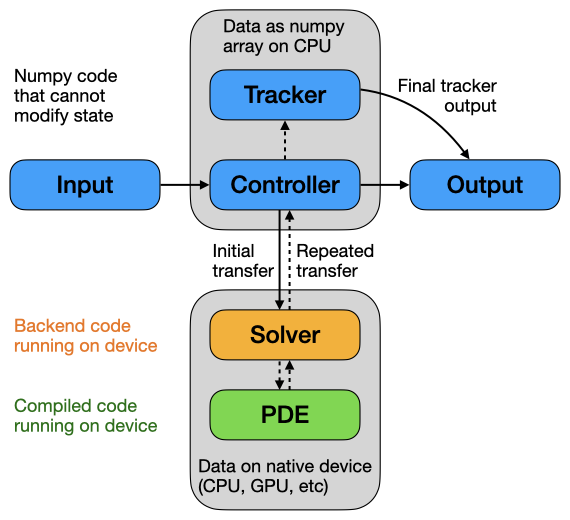
Schematic of the data flow during a simulation.
Since the package supports several different backends, data can reside in various places (e.g., CPU or GPU). To avoid confusion, we adhere to the following principles: Data that the user manipulates directly should always be stored in numpy arrays on the CPU. In contrast, inner loops for solving PDEs can move memory to GPU or any other device. Consequently, operators typically assume that data is stored in the native version of the respective backend.
The data layout of field classes (subclasses of FieldBase) was
chosen to allow for a simple decomposition of different fields and tensor components.
Consequently, data is laid out in memory such that spatial indices are last.
For instance, the data of a vector field field defined on a 2d Cartesian grid will
have three dimensions and can be accessed as field.data[vector_component, x, y],
where vector_component is either 0 or 1.
Note that FieldCollection linearizes all vector- and
tensor-components, to force all data in a unified array format.
How this works is shown in the following example:
grid = pde.UnitGrid([7, 9])
scalar = pde.ScalarField.random_uniform(grid)
assert scalar.data.shape == (7, 9)
tensor = pde.Tensor2Field.random_uniform(grid)
assert tensor.data.shape == (2, 2, 7, 9)
collection = pde.FieldCollection([scalar, tensor])
assert collection.data.shape == (5, 7, 9)

assert np.all(collection.data[0] == scalar.data)
assert np.all(collection.data[1] == tensor.data[0, 0])
assert np.all(collection.data[2] == tensor.data[0, 1])
assert np.all(collection.data[3] == tensor.data[1, 0])
assert np.all(collection.data[4] == tensor.data[1, 1])
3.5.4 Coding style
The coding style is enforced using ruff, based on the
styles suggest by isort and
black. Moreover, we use Google Style docstrings,
which might be best learned by example.
The documentation, including the docstrings, are written using reStructuredText, with examples in the
following cheatsheet.
To ensure the integrity of the code, we also try to provide many test functions,
contained in the separate sub-folder tests.
These tests can be ran using scripts in the scripts subfolder in the root
folder.
This folder also contain a script tests_types.sh, which uses mypy
to check the consistency of the python type annotations.
We use these type annotations for additional documentation and they have also
already been useful for finding some bugs.
Finally, we have pre-commit hooks, which you should install using pre-commit install.
We also have some conventions that should make the package more consistent and
thus easier to use. For instance, we try to use properties instead of getter
and setter methods as often as possible.
Because we use numba or torch to speed up computations, we need to pass
around (compiled) functions regularly. The names of the methods and functions that make
such functions, i.e. that return callables, should start with ‘make_*’ where the
wildcard should describe the purpose of the function being created.
3.5.5 Running unit tests
The pde package contains several unit tests, collected in the tests
folder in the project root. These tests ensure that basic functions work as expected,
in particular when code is changed in future versions. To run all tests, there are a
few convenience scripts in the root directory scripts. The most basic script is
tests_run.sh, which uses pytest to run the tests. Clearly, the python
package pytest needs to be installed. There are also additional scripts that for
instance run tests in parallel (needs the python package pytest-xdist installed),
measure test coverage (needs package pytest-cov installed), and make simple
performance measurements. Moreover, there is a script test_types.sh, which uses
mypy to check the consistency of the python type annotations and there is a
script format_code.sh, which formats the code automatically to adhere to our style.
Before committing a change to the code repository, it is good practice to run the tests, check the type annotations, and the coding style with the scripts described above.