Note
Go to the end to download the full example code.
2.2.8 Setting boundary conditions
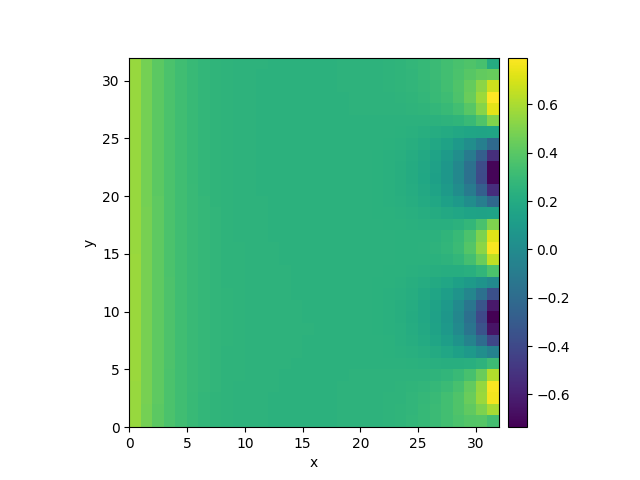
This example shows how different boundary conditions can be specified.
  0%|          | 0/10.0 [00:00<?, ?it/s]
Initializing:   0%|          | 0/10.0 [00:00<?, ?it/s]
  0%|          | 0/10.0 [00:00<?, ?it/s]
  3%|▎         | 0.295/10.0 [00:00<00:10,  1.10s/it]
  8%|▊         | 0.805/10.0 [00:00<00:07,  1.20it/s]
 17%|█▋        | 1.67/10.0 [00:01<00:06,  1.31it/s]
 28%|██▊       | 2.785/10.0 [00:02<00:05,  1.37it/s]
 41%|████      | 4.065/10.0 [00:02<00:04,  1.39it/s]
 54%|█████▍    | 5.42/10.0 [00:03<00:03,  1.40it/s]
 68%|██████▊   | 6.82/10.0 [00:04<00:02,  1.41it/s]
 82%|████████▏ | 8.24/10.0 [00:05<00:01,  1.42it/s]
 97%|█████████▋| 9.67/10.0 [00:06<00:00,  1.42it/s]
 97%|█████████▋| 9.67/10.0 [00:07<00:00,  1.38it/s]
100%|██████████| 10.0/10.0 [00:07<00:00,  1.42it/s]
100%|██████████| 10.0/10.0 [00:07<00:00,  1.42it/s]
from pde import DiffusionPDE, ScalarField, UnitGrid

grid = UnitGrid([32, 32], periodic=[False, True])  # generate grid
state = ScalarField.random_uniform(grid, 0.2, 0.3)  # generate initial condition

# set boundary conditions `bc` for all axes
eq = DiffusionPDE(
    bc={"x-": {"derivative": 0.1}, "x+": {"value": "sin(y / 2)"}, "y": "periodic"}
)

result = eq.solve(state, t_range=10, dt=0.005)
result.plot()
Total running time of the script: (0 minutes 7.105 seconds)